If your video has audio that conveys meaning, it needs captions. That's not aspirational. It's Web Content Accessibility Guidelines 2.1, Level A. Skip it and you're shipping content a portion of your audience can't use, and in the US you're a target for ADA complaints.
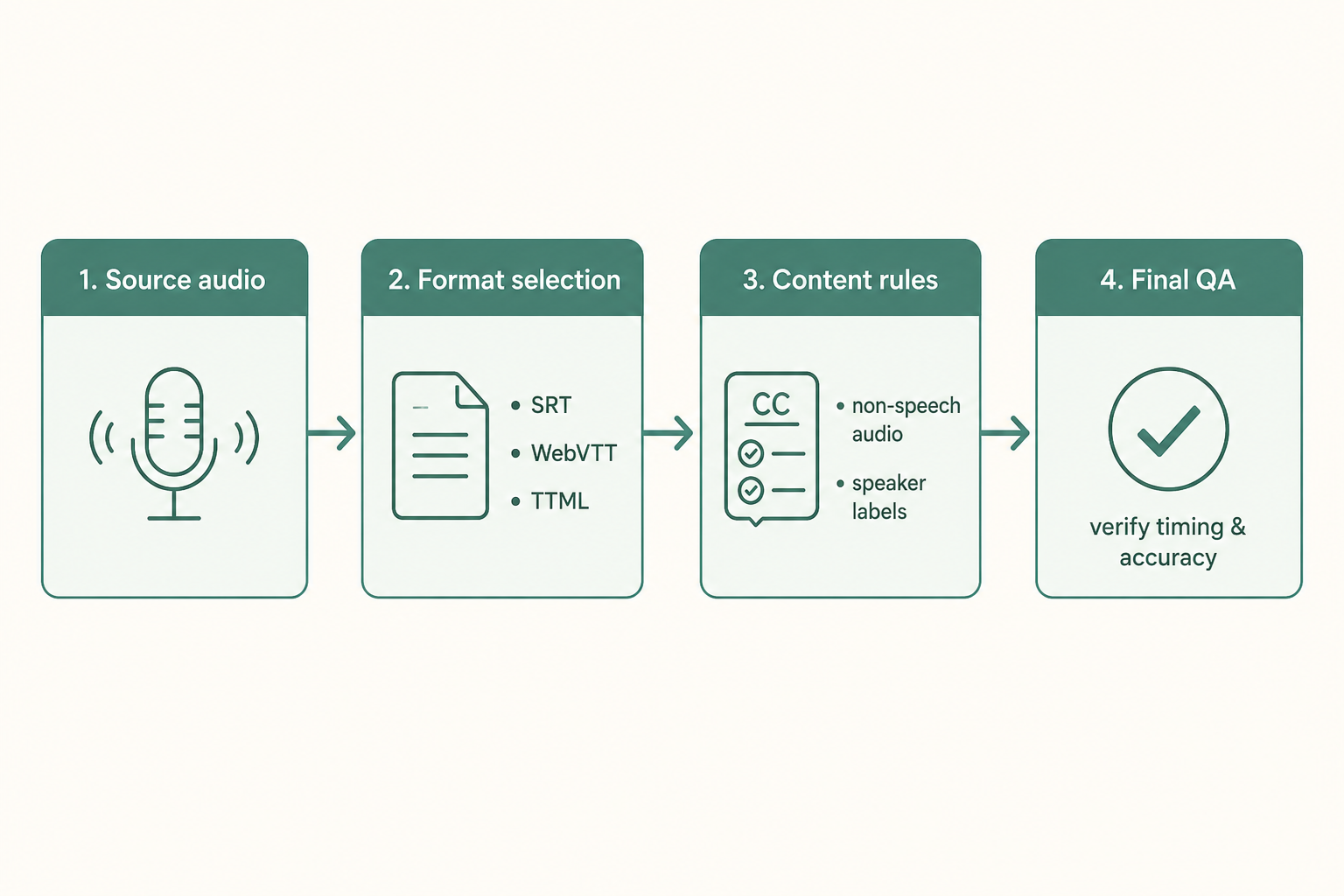
This is the checklist we run before any video ships with captions. Four phases: source audio, caption file, content rules, and QA. Run it top to bottom; the early phases save you rework on the later ones.
What WCAG actually requires for captions
The short version. Success Criterion 1.2.2 (Level A) requires synchronized captions for all prerecorded audio in video. Success Criterion 1.2.4 (Level AA) extends that to live video. 1.2.6 (Level AAA) adds sign-language interpretation, but most teams stop at AA.
"Synchronized" matters. Captions that lag a few seconds, summarize instead of transcribe, or skip non-speech audio (laughter, alarms, music with lyrics) fail. Captions are not subtitles. Subtitles assume the viewer can hear and only carry dialogue translation. Captions assume the viewer cannot hear and must carry whatever meaning the audio carries.
If you're publishing to a US federal site or a federally funded program, Section 508 applies and points back to WCAG 2.0 Level AA. For state and local government, see Title II of the ADA. Private US business websites have been treated as places of public accommodation in DOJ enforcement and several appellate decisions.
Phase 1: source audio (do this before you record)
Caption quality starts at the microphone. If you have to guess what the speaker said, your caption file becomes a liability.
- One microphone per speaker, positioned close. Built-in laptop mics are usually inadequate.
- Record in a quiet room. HVAC, refrigerator hum, and traffic show up as
[background noise]and force a human to clean up. - 16 kHz mono or higher, 16-bit minimum. WAV or FLAC for source. Save the raw file before any compression.
- A dedicated boom or lapel mic per speaker if there are more than two voices.
- Capture a quick room-tone recording. Useful for editing later.
Bad audio fed into auto-captioning costs you the savings ten times over in cleanup. See best practices for audio quality before transcribing for the deeper version of this phase.
Phase 2: caption file format and structure
WCAG is silent on file format, but your delivery platform isn't. Pick what your platform accepts:
- SRT: supported nearly everywhere, simple text format, no styling.
- WebVTT (.vtt): HTML5 video native, supports basic styling and positioning.
- TTML / DFXP: used by broadcast and some enterprise platforms.
For most web video, SRT or WebVTT will do. Our writeup on SRT vs plain transcript covers the picking logic if you're not sure.
Inside the file, the line-by-line rules most teams get wrong:
- Maximum two lines per caption.
- Around 32 characters per line, never above 42.
- One to seven seconds per caption. Less than one second is unreadable; more than seven looks frozen on screen.
- Reading speed under ~160 words per minute for adult audiences, lower for children's content.
- Break lines on natural phrase boundaries, not mid-clause.
Phase 3: what goes in the captions
This is where teams new to accessibility ship captions that look compliant but aren't. Captions must convey what a hearing viewer gets, including the parts that aren't dialogue.
- Speaker identification when the speaker isn't on screen or there are multiple voices. Use
>> SPEAKER NAME:or[Maria]:. - Non-speech audio that conveys meaning:
[door slams],[crowd applauds],[ominous music]. Skip the chair scraping. - Music with lyrics: caption the lyrics in italics or use
♪markers, with attribution if known. - Foreign-language dialogue: caption in the original language if a hearing viewer would also hear it without translation; otherwise translate.
- Profanity: caption it. Sanitizing it to
[expletive]is editorializing. - Numbers and proper nouns: spell them as the speaker says them, not as numerals where ambiguous.
The Described and Captioned Media Program's Captioning Key is the closest thing to an industry standard for these editorial calls. Link in Sources.
Phase 4: accuracy you can actually defend
The FCC's caption quality rules (which apply to TV but set the standard everyone else copies) require captions to be accurate, synchronous, complete, and properly placed. In practice:
- 99%+ word-level accuracy on broadcast and federal-context content; 95%+ is the floor for everything else.
- Sync within 1 to 2 seconds of the audio at all times.
- Coverage of the entire program, including intros, outros, and silent visual moments where music or sound effects are happening.
Raw AI captions land in the 85 to 95% range on clean audio and drop fast with background noise, accents, and overlapping speech. Plan for a human pass on anything that goes out under your brand. If you're processing a backlog, transcribe the video first and edit the transcript before exporting the SRT. It's faster than editing inside a caption tool.
Paste any public link or upload a file and get a clean transcript in minutes. First 3 clips every month are on us — no card required.
How do you QA captions before publishing?
Run through this on the rendered video, not in the caption editor:
- Play the entire video with sound off and only captions visible. Can you follow the story?
- Play it with sound on and captions on. Are captions ahead, behind, or in time?
- Check the first and last minute. Sync drift most often appears at the edges.
- Check that captions don't cover speakers' faces or critical on-screen text.
- Confirm the platform actually serves the caption file (the CC button should appear in the player).
Watch for the patterns that fail audits most often:
- Auto-captions only. YouTube auto-captions on their own are not WCAG-compliant. The W3C is explicit that automatically generated captions do not meet 1.2.2 without human review.
- Burned-in captions (open captions) with no toggle. Accessible in one sense, but viewers can't restyle them, which can fail 1.4.4 (Resize Text) on some platforms.
- No non-speech audio cues. Skipping the
[laughter]or[alarm]because "it's obvious." It isn't if you can't hear. - Translation-only subtitles labeled as captions. Common on indie video. Different artifact, different purpose.
Where VTS fits
VTS gives you the transcript: accurate, speaker-labeled, downloadable as SRT or VTT, that the human review pass works against. Whether you finish captions in VTS, a dedicated caption editor, or your NLE, you save the slow first 80% of the work. For the editorial calls (speaker ID, sound effects, line breaks), there's no substitute for a human pass. See our companion piece on creating accessible content with subtitles.