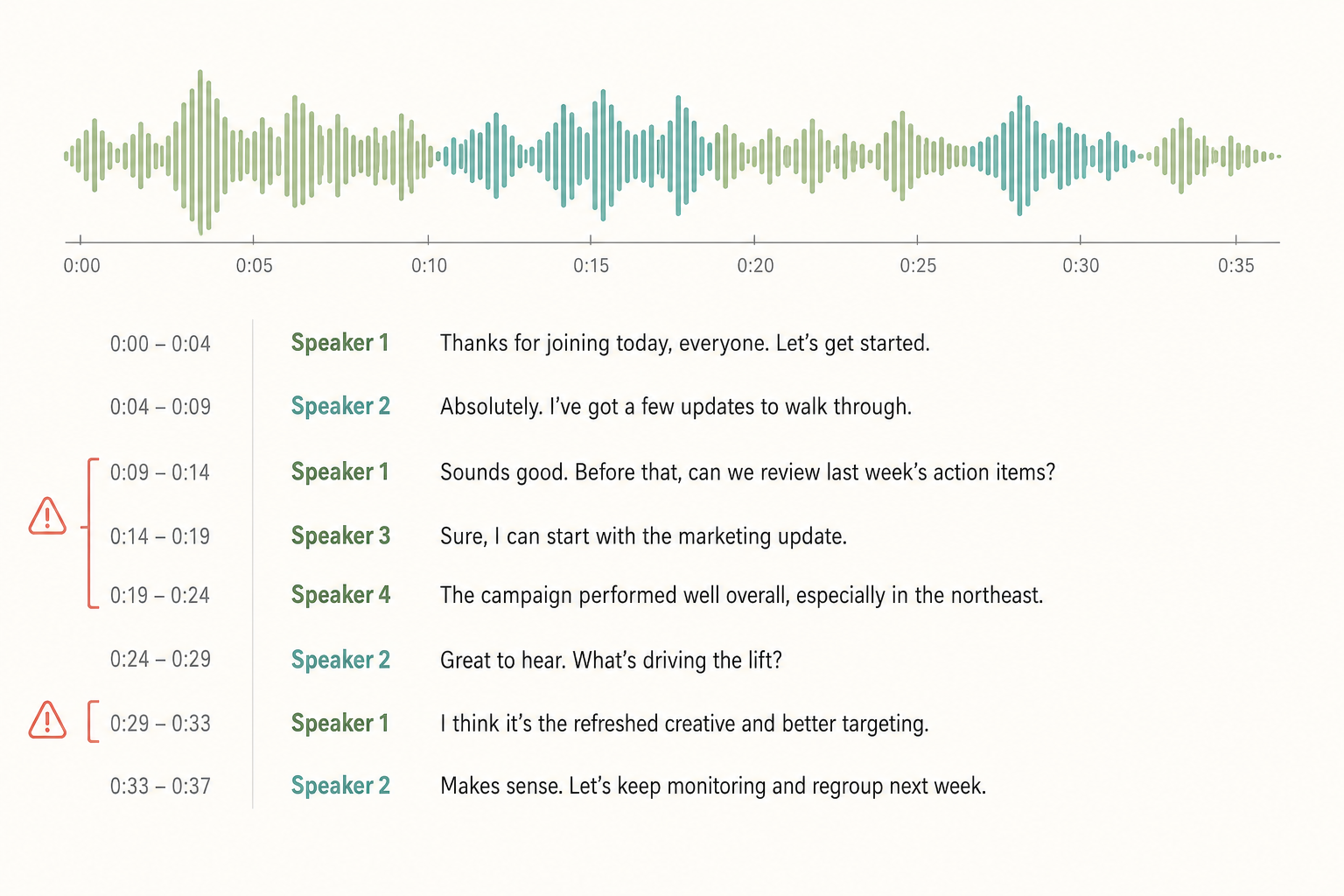
You exported a transcript expecting Speaker 1 and Speaker 2 to map cleanly to the host and the guest. Instead it's a mess. The guest's monologue gets sliced into four "speakers," your own intro is labeled Speaker 3, and somewhere in the middle the labels swap entirely.
Speaker diarization fails for predictable reasons, and most are fixable without re-recording. Here are the causes in order of how often they actually show up, what to check, and what to do.
First fix: confirm diarization actually ran
Half the wrong-speakers complaints we see aren't wrong labels at all. They're missing labels. Many transcription tools treat diarization as an optional flag you have to turn on. Otter and Descript enable it by default; Whisper by itself doesn't do it at all (you need pyannote or WhisperX layered on top).
Check this before anything else:
- Did you enable speaker identification in your tool's settings?
- If you used raw Whisper or faster-whisper, did you run diarization as a separate step?
- Does your transcript actually have speaker tags, or is it one long block of text?
If diarization didn't run, that's your fix. Re-process with it on. If it ran and you still see chaos, keep reading.
Cause 1: You didn't tell the model how many speakers
Diarization models guess speaker count when you don't specify it. They almost always over-estimate. A single guest who speaks for 20 minutes gets split into Speaker 2 and Speaker 4 because their tone shifted halfway through, or the mic gain auto-adjusted, or they leaned away for a moment.
How to confirm: count the unique speaker labels in your transcript. If it's higher than the real number of people in the room, this is your cause.
Fix: most tools (AssemblyAI, Otter Pro, pyannote, Rev) let you pass an expected speaker count. Set it. If you're not sure of the exact number, pass a min and a max (say, 2 and 3) to bound the search.
Cause 2: Speakers overlap or interrupt each other
When two people talk over each other in a normal podcast interview or a four-person Zoom, diarization gets the boundaries wrong. The model assigns the louder voice to the segment and quietly drops the other.
How to confirm: listen back at the spots where the labels look off. If two people are talking at once there, this is it.
Fix: if you can re-record, give each speaker their own mic on their own track and run diarization per channel. If you can't, look for a tool that supports word-level speaker tagging instead of segment-level. It handles overlap noticeably better. Re-transcribing with a higher-accuracy model and longer audio context can also help, but it won't fix bad source audio.
Cause 3: The voices are too similar
Two men with similar pitch. Two women in the same accent. Models distinguish speakers by acoustic features (pitch, formants, speaking rate), and the closer those features, the more often the model swaps them.
How to confirm: the labels are roughly right at the start but drift mid-conversation. A speaker quietly switches identity after a topic change or a pause.
Fix: there's no magic flag for this. Practical options:
- Use a tool that supports speaker enrollment, where you give it a labeled sample of each voice up front. Pyannote and a few commercial APIs offer this.
- Manually relabel a few clear segments and use them as anchors when cleaning up the rest of the transcript.
- If transcription quality matters more than time saved, hand-edit the speaker tags in an editor that lets you fix a span in one click.
Cause 4: Mono audio with one mic for the whole room
This is the most common cause we see for in-person interviews, focus groups, and council hearings. One mic in the middle of a table picks up everyone at roughly the same level, with no spatial separation. Diarization has very little to work with.
How to confirm: check the file properties. Is it mono? Single channel? Is there one recording rather than one per speaker?
Fix: for future recordings, give each speaker a mic and record multi-track. For the file you already have, the realistic options are (a) accept a noisy diarization pass and clean it manually, or (b) use a transcription service tuned for conversational diarization on single-mic audio. Read best practices for audio quality before transcribing before your next session so this doesn't happen again.
Cause 5: The file is long and the model loses the thread
Most diarization models degrade on files past 60 to 90 minutes. Speaker labels that were stable in the first half start drifting or splitting in the second.
How to confirm: the early part of the transcript is clean; the labels go sideways in the back half.
Fix: split the file into 30 to 45 minute chunks, diarize each chunk separately, and reconcile the speaker IDs afterward (the first speaker in chunk 2 is the same person as Speaker 1 in chunk 1, and so on). Some tools handle long-form diarization better than others. WhisperX and AssemblyAI both have specific support for it. If you do a lot of long recordings, pick a tool built for that case.
When to fix it in post, re-record, or switch tools
Three rules of thumb:
- Fix in post when the labels are 80%+ right and you can audit the bad spots quickly. Most transcript editors let you reassign a speaker for a span in one click.
- Re-record when the audio is mono, one room mic, and you'll be running this kind of session again. The cost of fixing two hours of bad labels by hand is higher than the cost of buying lavalier mics.
- Switch tools when you're hitting a structural limit. Your tool doesn't accept an expected speaker count, can't handle multi-channel input, or chokes on 90+ minute files. Don't waste another session on a tool that can't do what you need. See what speaker diarization actually does for what to look for in a replacement.
The fastest way to know which bucket you're in: take a five-minute clip from a problem section, run it through a different tool with diarization on, and see if the labels come back clean.
Paste any public link or upload a file and get a clean transcript in minutes. First 3 clips every month are on us — no card required.



