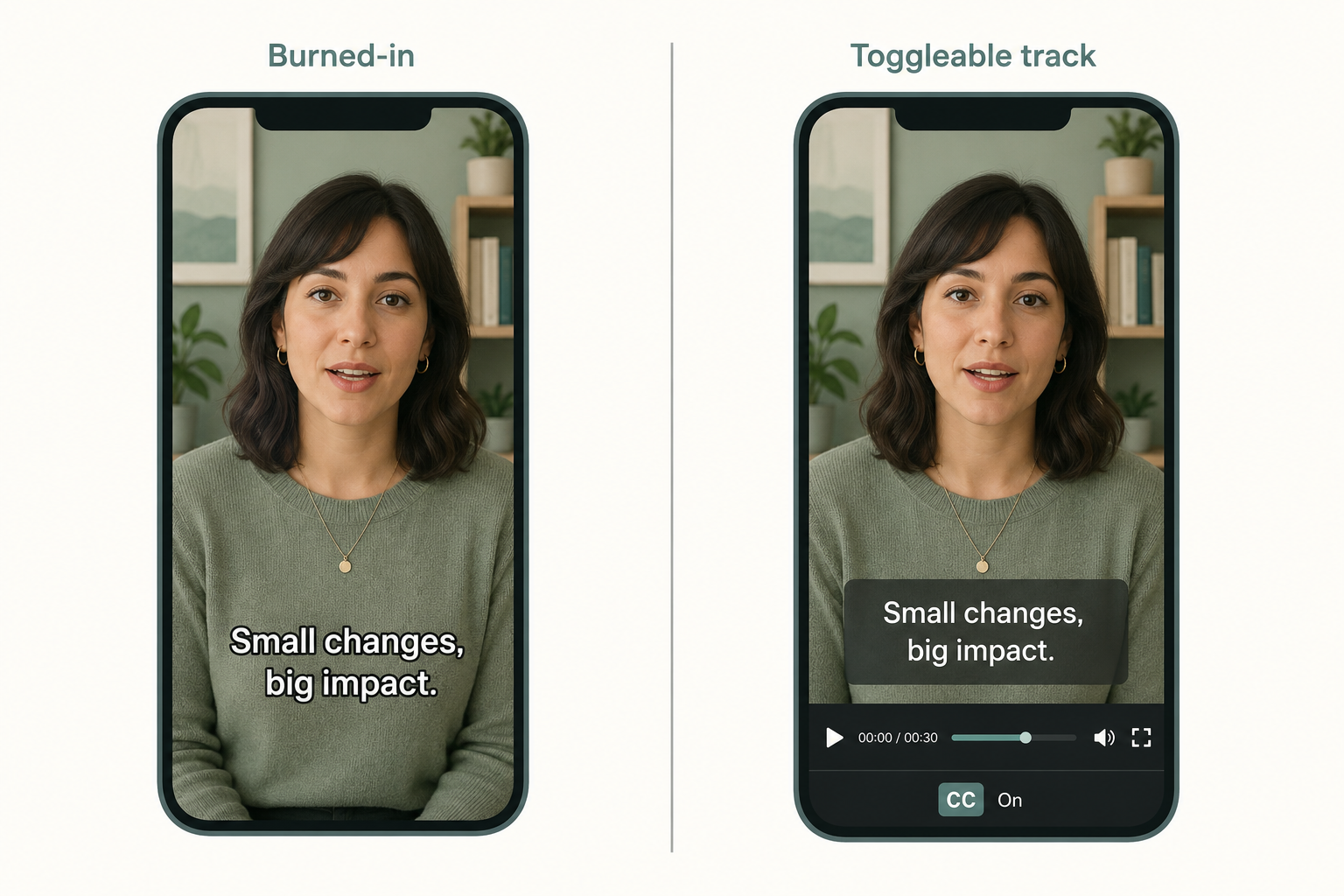
Closed captions can be turned off. Open captions can't. That's the whole technical difference — but it changes everything about when each one fits.
Closed captions sit on a separate track. The viewer toggles them with a CC button, and the player overlays the text on playback. Open captions are baked into the video pixels at export. They're permanent, they travel with the file wherever it goes, and nobody can turn them off.
Pick the wrong one and you either fail an accessibility audit or watch your TikTok engagement crater. The choice depends entirely on where the video plays and who's watching.
What are open captions vs closed captions?
Open captions are burned into the video frame. Soft subtitles, hardsubs, "always-on captions" — different names, same thing. Once the video is exported with open captions, the text is part of the picture.
Closed captions are stored as a separate text track and rendered by the player. The text and timing live in a sidecar file (.srt, .vtt, .scc) or an embedded stream. The viewer can turn them on or off, change font size, sometimes pick a language.
A quick test if you're not sure which a video has: try to take a screenshot. If the text appears in the screenshot, it's open. If it disappears, it's closed.
Both should follow caption conventions, not subtitle conventions. They describe sound effects, music cues, and speaker labels, not just dialogue. That distinction matters next.
Captions vs subtitles aren't the same
People use these words interchangeably. They're not.
Captions are written for someone who can't hear the audio. They include dialogue, speaker IDs when it's not obvious, and non-speech information: [door slams], [soft piano music], [laughter].
Subtitles assume the viewer can hear but doesn't understand the language. They translate dialogue and that's it. No music cues, no [sighs].
This is why a "subtitle file" from a translation service usually fails an accessibility audit if it's labeled as captions — it's missing the non-speech information. If you need both compliance and translation, you need a caption track in English plus subtitle tracks in other languages, not one file doing two jobs. The WCAG captions compliance checklist covers what a compliant caption track actually has to include.
When should you use closed captions?
Closed captions are the default for most professional use cases. Three reasons.
Compliance. WCAG 2.1 Level A requires captions for prerecorded video; the ADA and Section 508 have pulled WCAG in for years. The FCC requires closed captions on broadcast TV and most online video that originally aired on TV. Closed captions satisfy these because they're a real track the assistive tech can parse — a screen reader knows it's a caption, not just pixels.
Viewer control. A hearing viewer who wants to watch without captions can turn them off. A viewer who needs larger text on their phone can resize. Neither is possible with open captions.
Multiple languages. One video, multiple .vtt tracks: English captions plus Spanish, French, and German subtitle tracks. The viewer picks. With open captions you'd need a separate exported video per language.
SEO. Search engines index the text track. A burned-in caption is just pixels to a crawler. It can't read the words. We covered this in more detail in do subtitles help video SEO.
Use closed captions for YouTube, Vimeo, your website's video player, LMS courses, and anything that needs an accessibility-compliance paper trail.
When should you use open captions?
Open captions win in one category: social platforms where viewers don't reliably turn CC on.
On TikTok, Instagram Reels, and short-form Facebook video, most viewers watch with sound off and never tap the CC button — assuming the platform even shows it. If your captions are closed and the viewer doesn't toggle them, your video plays silently with no text. Engagement drops, retention drops, the algorithm punishes you.
Burning captions in solves that. The text is always visible because it's part of the picture. Creators on these platforms treat open captions as a baseline production step, not an accessibility feature.
Open captions also make sense for:
- Festival submissions when the festival requires hardcoded subtitles.
- Conference room playback where the venue's player doesn't support sidecar tracks.
- Stylistic captions like kinetic typography, branded fonts, and animated word reveals. These can't be done in a .srt file.
- Files that travel through editing tools, compression, and re-uploads where a caption track might get stripped.
The tradeoff is real: viewers can't turn them off, they don't scale to other languages, and search engines can't read them. Use open captions when reach in a mute-by-default feed matters more than those tradeoffs.
Are open captions WCAG compliant?
This trips people up. Yes, if they're done right.
WCAG 2.1 Success Criterion 1.2.2 requires synchronized captions for prerecorded audio. It does not require them to be a separate track. Open captions count, as long as they meet the same content requirements: accurate dialogue, speaker identification when needed, and non-speech information like sound effects and music cues.
The catch is that open captions can't be styled by the viewer. A user with low vision who needs larger text can't resize them. Some assistive workflows that expect a parseable track won't see them as captions, just as pixels.
For pure WCAG compliance, closed captions are the safer default. For social feeds where reach beats edge-case accessibility tooling, open captions are defensible, but they have to be readable: high contrast, large enough type, positioned away from on-screen UI.
How do you create each one?
Both start the same way: an accurate, time-coded transcript.
For closed captions, you export that transcript to .srt or .vtt and upload it as a sidecar to the video. Most players (YouTube, Vimeo, native HTML5, JW Player) read these directly. The mechanics of the file format are in how to add subtitles to your videos using SRT files.
For open captions, you take the same caption file into a video editor (Premiere, DaVinci Resolve, Final Cut, CapCut) and burn it into the timeline before export. The editor renders the text onto each frame.
A practical workflow: generate the time-coded transcript once, export to .srt for the YouTube upload, and use the same file as the source for the burned-in social cuts. One transcript, both delivery modes.
So which should you pick?
| Scenario | Pick |
|---|---|
| YouTube long-form, Vimeo, LMS | Closed |
| Accessibility compliance (WCAG/ADA/Section 508) | Closed |
| TikTok, Reels, short-form Facebook | Open |
| Festival or broadcaster that mandates hardcoded subs | Open |
| Multilingual website player | Closed (multiple tracks) |
| Stylized kinetic typography | Open |
| Mute-by-default conference room | Open |
Most teams end up doing both for the same content: closed captions on the platform where users can toggle them, an open-captioned cut for the social platforms where they won't.
Paste any public link or upload a file and get a clean transcript in minutes. First 3 clips every month are on us — no card required.



