You uploaded a quiet recording and the transcript says things nobody said. Welcome to the most frustrating quirk in modern speech recognition: Whisper hallucinations.
The fastest fix in 80% of cases is to trim silence longer than 2 seconds out of your file before sending it to Whisper. That single change kills most made-up sentences. The rest of this post covers the other causes and the order to try fixes in.
What's a Whisper hallucination, exactly?
A Whisper hallucination is when the model outputs words for audio that contains no speech, or invents content that isn't actually in the recording. You'll see it most often as:
- Repeated phrases that loop ("Thanks for watching. Thanks for watching. Thanks for watching.")
- A YouTube-style outro added to silent audio ("Subscribe to my channel for more")
- Plausible-sounding but fabricated sentences during long pauses
- The same line transcribed two or three times back-to-back
The model isn't lying on purpose. It was trained on hundreds of thousands of hours of internet audio, much of it YouTube. When it gets confused — usually by silence, by music, or by audio it can't decode — it falls back to the patterns it saw most: video outros, podcast tags, common sign-offs.
Why does Whisper hallucinate in the first place?
Three reasons, roughly in order of how often they bite people.
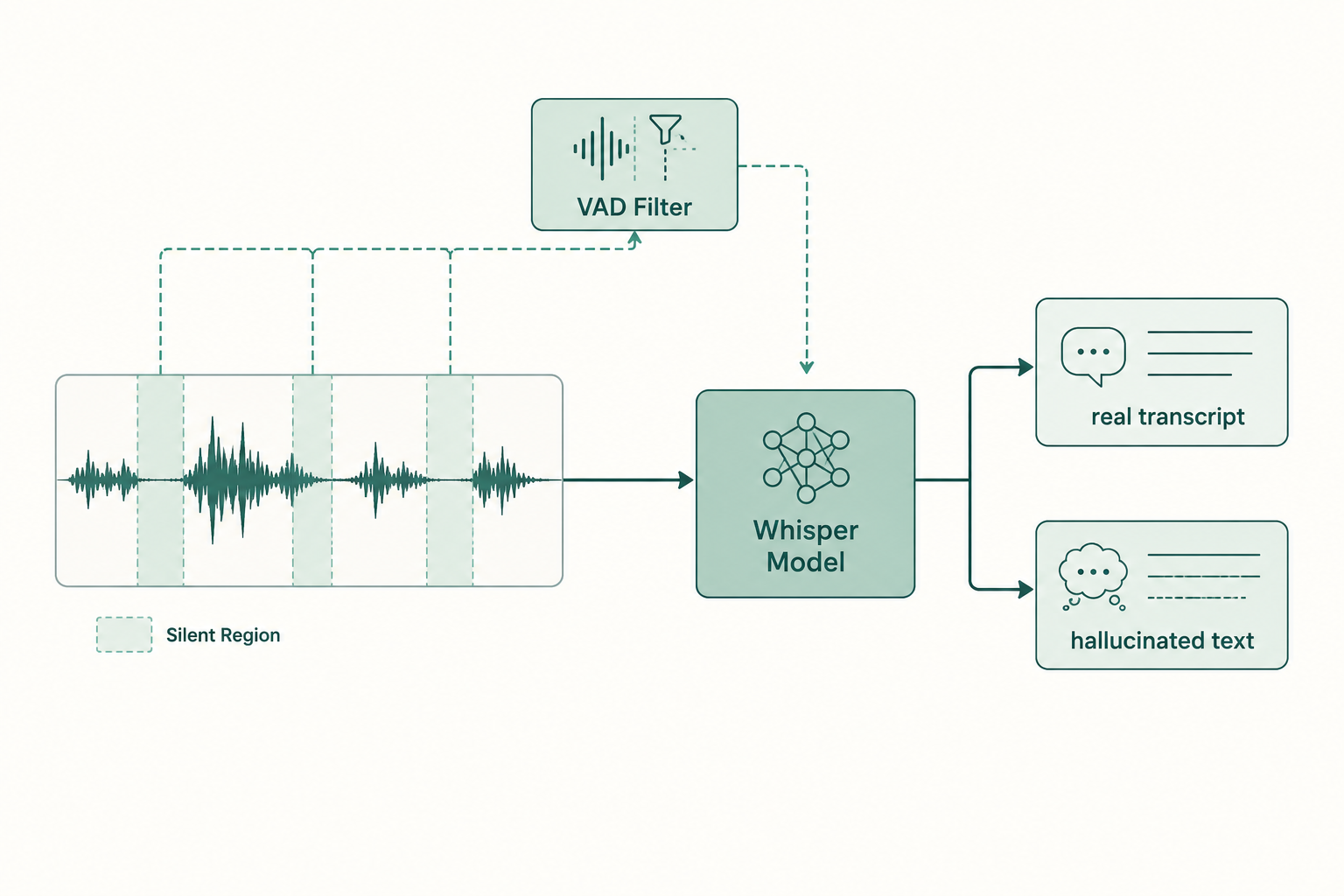
Silence. Whisper processes audio in 30-second chunks. If a chunk is mostly silent (or just very quiet), the decoder still has to output something. With no real signal to anchor to, it predicts what it has seen most often in similar-looking training data, which is often a YouTube outro or a podcast sign-off.
Repeating loops. The decoder can get stuck. Once it starts outputting a phrase that matches a high-probability training pattern ("Thank you for watching"), the autoregressive generation keeps choosing that path. You end up with the same line ten times in a row.
Out-of-distribution audio. Music, noise, applause, room tone, a phone ringing in the distance, anything that isn't clearly speech. Whisper tries to interpret it as language and produces guesses that sound linguistically plausible but bear no relation to the input.
There's also a documented problem with long-form audio specifically: errors compound across chunks because Whisper uses prior text as conditioning context. One hallucination feeds the next.
How do I stop Whisper from making up sentences?
In rough order of "try this first":
Use a VAD (voice activity detection) pass before transcription. silero-vad or pyannote will mark non-speech regions you can cut. Faster-whisper has a vad_filter=True option that does this in-line.
no_speech_threshold.
Default is 0.6. Drop it to 0.3 to make Whisper more eager to declare "no speech here" and skip the chunk. Combine with logprob_threshold=-1.0 so low-confidence segments get dropped instead of hallucinated.
condition_on_previous_text=False.
This is the single biggest lever for long files. It stops the model from feeding its own (possibly hallucinated) output back as context, which is what causes the compounding errors and the repeating loops.
initial_prompt carefully.
A prompt with real domain words (speaker names, jargon) helps, but a prompt that ends with a colon or a common phrase can seed a hallucination. Keep it neutral.
Both implementations have better default chunking behavior and VAD integration is straightforward. See faster-whisper vs OpenAI Whisper for the tradeoffs.
Convert weird formats to 16 kHz mono WAV before sending it in. Whisper's preprocessor handles most things, but lossy or unusual containers occasionally cause garbage decodes.
If steps 1-3 don't fix it, the problem isn't Whisper's parameters. It's the audio.
Does model size matter? Which Whisper hallucinates least?
Larger models hallucinate less, but they don't stop. large-v3 is the current best on this. large-v2 is more conservative on long-form audio in practice, and some users prefer it specifically for that reason. medium and below hallucinate noticeably more, especially on silence.
The difference isn't subtle. If you're getting fabricated content on base or small, just upgrading to large-v3 will cut the rate substantially. You'll pay in inference time (roughly 5-10x slower than small), which is why most production stacks run a quantized large variant under faster-whisper.
Why does silence cause hallucinations specifically?
Whisper was trained on a dataset where almost every 30-second window contained speech. Pure silence is genuinely out-of-distribution for the model. When you feed it 30 seconds of nothing, the decoder is essentially asked "what comes next?" with no signal, and the highest-probability completion in its training data tends to be an outro or a sign-off, because that's what often follows silent moments in YouTube videos.
This is also why background music or applause triggers hallucinations: the model assumes there's something to transcribe and reaches for whatever pattern best fits the audio embedding. A worship service with congregational singing will get transcribed as song lyrics from songs that exist in the training data, not the song actually playing.
My audio is clean and it still hallucinates. What now?
A few less-obvious causes:
Sample rate mismatch. Whisper expects 16 kHz internally. If your pipeline resamples poorly (e.g. from 8 kHz phone audio), the spectrogram is degraded and the model starts guessing.
Very long files without VAD. Past about 30 minutes the conditioning-context drift gets meaningful. Split the file into 5-10 minute chunks at silence boundaries and transcribe each independently.
Multilingual audio. If language detection runs on a silent intro, it locks in the wrong language for the whole file and produces phonetic garbage. Pass language="en" (or whichever) explicitly.
Specific accents or low-resource languages. Some accents are underrepresented in training data and get worse outputs, sometimes including hallucinations. Related: why AI transcripts get names wrong covers the same root cause.
If you're transcribing anything where accuracy matters (medical, legal, court records) never ship a Whisper transcript unreviewed. Researchers have documented Whisper inventing entire sentences in clinical settings. Always human-review.
When should I stop tuning and switch tools?
If you've turned off conditioning, added VAD, used large-v3, and you're still getting fabricated content, the file itself is the problem and no amount of parameter tweaking will fix it. At that point your options are:
- Pre-process more aggressively. Noise reduction (RNNoise, demucs for music separation), then transcribe the cleaned audio.
- Try a different ASR model entirely. AssemblyAI and Deepgram have proprietary models that drop low-confidence audio rather than guess.
- Use a managed service that handles the preprocessing. If you'd rather not run any of this yourself, transcribe an audio file with VTS, which runs faster-whisper with VAD enabled and silence-trimming on by default, so the most common hallucination causes are dealt with before the model ever sees your file.
For a sense of what accuracy is realistic across audio types, see transcription accuracy: what to expect.
Paste any public link or upload a file and get a clean transcript in minutes. First 3 clips every month are on us — no card required.
Sources
- OpenAI Whisper repository — official documentation, parameters, and model card
- Robust Speech Recognition via Large-Scale Weak Supervision — the original Whisper paper, including training-data composition
- faster-whisper — VAD integration and CTranslate2 implementation details
- Silero VAD — the voice activity detector most commonly paired with Whisper