You'd think there'd be a universal rule. There isn't.
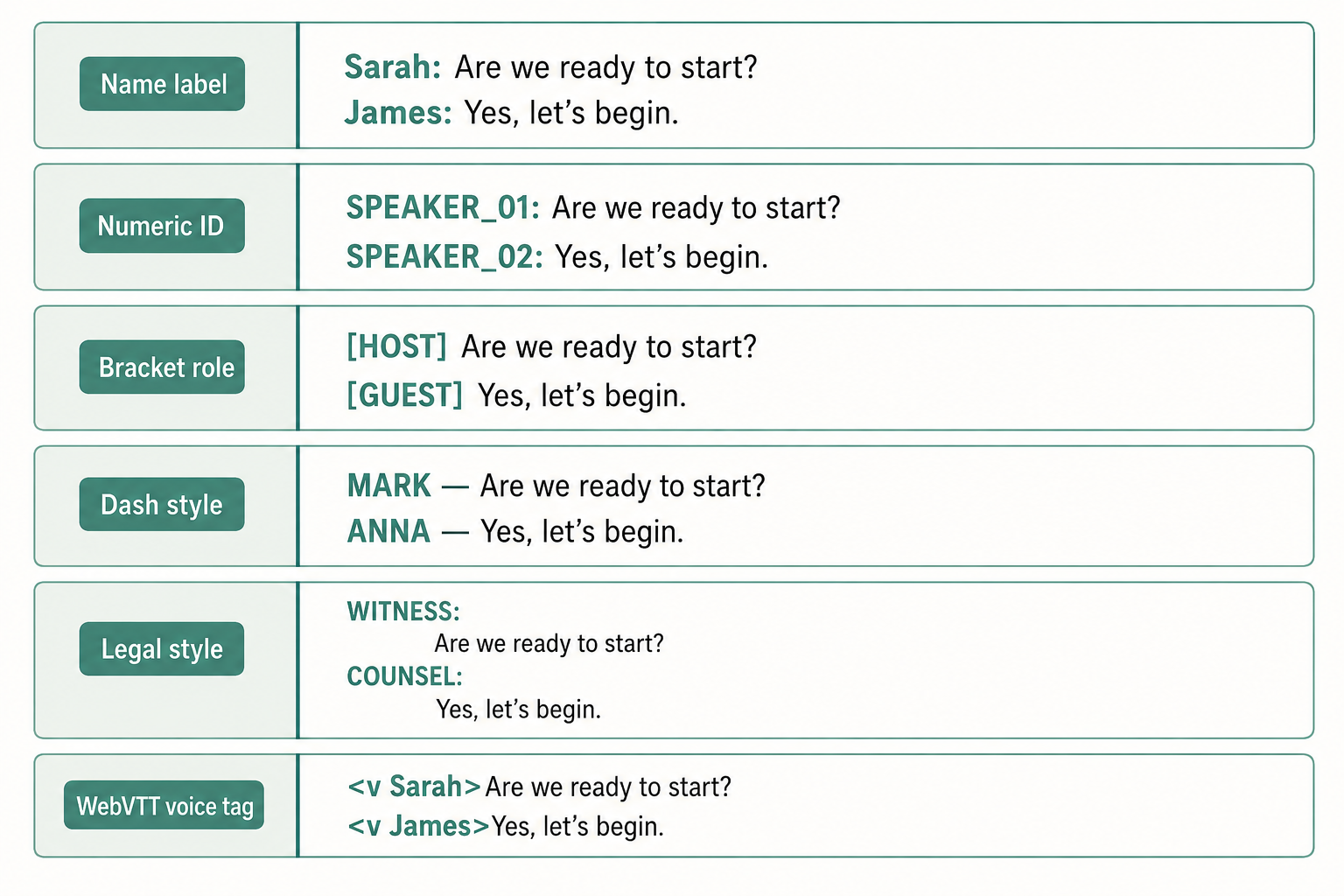
There are about six widely-used ways to format speaker labels in a transcript, and the 'correct' one depends on what the transcript is for — a deposition, a research interview, a podcast, captions on a video, or the raw output of an AI model. Pick the wrong convention and the document is harder to read, harder to cite, and in some cases (captions) technically non-compliant with the spec.
Here's the field guide.
- The most readable default is Name: text on its own line, with a blank line between turns.
- Use SPEAKER_01 or Speaker 1 only when you don't know who's talking. Replace with real names as soon as you do.
- For captions, WebVTT voice tags (
<v Sarah>…</v>) are the spec-correct way to identify speakers. - Verbatim legal transcripts use ALL-CAPS names with the speech indented under the name.
- Always include speaker labels for two or more voices, even if one barely speaks.
- One label per speaker turn. Never re-label every sentence.
What does a speaker label actually look like?
A speaker label is the tag that tells the reader who's talking. In its simplest form it's a name followed by a colon, then the words they said.
Where conventions diverge is on five things: whether to use a real name or a generic identifier, whether to capitalize, whether to bracket, whether to include a timestamp, and whether the label sits inline or on its own line. Get those five choices right for your context and the transcript reads itself.
The 6 most common speaker label formats
1. Name + colon (the readable default)
Sarah: Thanks for joining us today.

Mark: Happy to be here.
This is what you want for podcast transcripts, show notes, interviews for publication, and most research interviews. It reads cleanly, takes the eye almost no time to parse, and works in any plain-text editor. Put each turn on its own line with a blank line between speakers.
2. Numbered speaker (when names are unknown)
Speaker 1: Thanks for joining us today.
Speaker 2: Happy to be here.
This is what AI transcription tools output when diarization detects multiple voices but doesn't know who's who. It's an interim format. Useful while you're verifying who said what, but you should replace Speaker 1 and Speaker 2 with real names before publishing. If you're transcribing a meeting with people you know, this should never be the final form.
3. Bracketed tag (machine-readable)
[SPEAKER_01] Thanks for joining us today.
[SPEAKER_02] Happy to be here.
This is the convention pyannote, NeMo, and similar speaker-diarization pipelines emit. It's designed to be unambiguous for downstream code that needs to split a transcript by speaker. If you're writing a script that consumes diarized output, this is what you'll parse. For human readers, prefer one of the others.
4. ALL-CAPS name (legal and court reporting)
SARAH:  Thanks for joining us today.

MARK:   Happy to be here.
Legal transcripts — depositions, hearings, court proceedings — almost always use ALL-CAPS names with the speech indented past the colon. The convention dates back to typewritten transcripts where caps were the unambiguous way to set the speaker tag apart from the dialogue. If you're producing or working with a deposition transcript, follow this format.
5. Name + timestamp (podcasts, video editing, audit trails)
[00:00:15] Sarah: Thanks for joining us today.
[00:00:18] Mark: Happy to be here.
Add a timestamp before the speaker label when the transcript will be used for video editing, podcast show notes with jump links, or anything where the reader needs to find a specific moment in the audio. See our guide on getting the most out of timestamped transcripts for placement options and resolution choices.
6. WebVTT voice tag (captions, accessibility)
WEBVTT

00:00:15.000 --> 00:00:17.500
<v Sarah>Thanks for joining us today.</v>

00:00:18.000 --> 00:00:19.500
<v Mark>Happy to be here.</v>
This is the spec-correct way to identify speakers in WebVTT captions. The <v Speaker Name>…</v> tag tells screen readers and compliant caption renderers who's speaking. SRT (the older sibling format) has no equivalent. Captioners typically prefix the line with a name like - Sarah: or [SARAH] instead. If you're building captions, see VTT vs SRT for the format trade-offs.
Which convention should you pick?
| Use case | Format |
|---|---|
| Podcast transcript / show notes | Name + colon (optionally with timestamps) |
| Research interview (academic) | Name + colon, on its own line |
| Legal / deposition transcript | ALL-CAPS name + colon |
| Captions (.vtt) | <v Name> voice tag |
| Captions (.srt) | - Name: prefix |
| Journalism (quote extraction) | Name + colon |
| AI raw output / scripts | Bracketed [SPEAKER_01] |
| Unknown speakers (interim) | Speaker 1, Speaker 2 |
If you're not sure which to pick, Name + colon on its own line is the safe default. It works for almost everything except captions and formal legal records.
Inline or block: where does the label sit?
You have two layouts for the label itself.
Block format, with the speaker on its own line:
Sarah:
Thanks for joining us today. I think the audience will get
a lot out of this conversation.

Mark:
Happy to be here.
This is common in screenplays and some legal styles. It survives line wrapping cleanly because the label never gets pushed across a line break, but it doubles the vertical space.
Inline format, with the speaker on the same line as the speech:
Sarah: Thanks for joining us today. I think the audience will
get a lot out of this conversation.

Mark: Happy to be here.
This is the default for podcasts, research, and journalism. It's denser and reads faster. Most readers prefer it.
Pick one and stick with it across the document. Mixing the two formats is the single most jarring readability problem in transcripts.
How should you label unknown speakers?
If diarization detects a voice you can't identify, the conventions are:
Speaker 1,Speaker 2,Speaker 3— numbered in order of first appearanceUnknown Speaker,Unknown 1— when there's only one mystery voiceAudience Member,Caller,Reporter— generic roles for contextOff-camera,Voiceover— for production transcripts
Don't leave a turn unlabeled. A missing label looks like a typo and breaks the visual rhythm. If you genuinely can't tell who's talking, label it Unknown and note the timestamp so you can come back to it.
This is where AI transcription quietly slips up. Most tools will misattribute speakers when voices are similar or someone steps in mid-sentence. Always spot-check the first 5–10 turns of any auto-diarized output before you trust the rest.
What about speaker labels in SRT or VTT captions?
For captions, the rules are stricter because the format has to render in a player.
WebVTT supports inline speaker identification via the <v> tag:
00:00:15.000 --> 00:00:17.500
<v Sarah>Thanks for joining us today.</v>
The tag is invisible to most viewers but read by screen readers and used by some players to display the speaker name. The W3C spec is explicit: this is how you identify speakers in WebVTT.
SRT has no voice tag at all. Captioners use one of three patterns:
1
00:00:15,000 --> 00:00:17,500
- Sarah: Thanks for joining us today.

2
00:00:18,000 --> 00:00:19,500
- Mark: Happy to be here.
The leading dash is the convention from broadcast captioning for differentiating speakers in two-shot dialogue. Some captioners drop the dash and use [Sarah] or SARAH: instead. There's no wrong answer in SRT because the format never defined one.
Common speaker labeling mistakes
A few that show up over and over:
- Re-labeling every sentence instead of grouping a turn under one label. The speaker label marks a change of speaker, not the start of every line.
- Switching conventions mid-document. Starting with
Sarah:and shifting toS:halfway through, or going from full names to initials. Pick one and hold it. - Using initials when full names would do.
S:andM:save typing but cost the reader real effort. Only use initials when speakers explicitly request anonymity. - Inconsistent capitalization.
Sarah:andSARAH:mixed in the same document looks like sloppy editing. Match the convention to the use case and stay there. - Labeling crosstalk as one speaker. When two people speak over each other, label each line separately and add
[crosstalk]as a note. Don't merge their words under one tag. - Forgetting to anonymize when promised. If you told participants they'd appear as
P1,P2, etc., don't slip a real name in turn 47.
Most of these are easier to catch in the editing pass than to fix later. If you're producing transcripts at any volume, you can transcribe a video with VTS, then run a single find-and-replace to normalize labels across the document.
Paste any public link or upload a file and get a clean transcript in minutes. First 3 clips every month are on us — no card required.
FAQ
Should speaker labels be in bold?
In Markdown or rich-text deliverables, bolding the name (**Sarah:**) makes turns easier to scan and is widely used in podcast show notes. In plain-text deliverables (.txt, .srt), don't bold — the asterisks will render literally.
What's the right format if I'm using AI transcription?
Most AI tools output Speaker 1: … or [SPEAKER_01] … by default. Treat that as a draft. Re-label with real names before sharing or publishing. Readers shouldn't have to guess who Speaker 2 is.
Do I need speaker labels for a one-person recording?
No. A monologue, a lecture, or a voice memo doesn't need labels. Add a timestamp prefix instead if the reader needs to navigate the audio.
Can I cite a transcript with speaker labels in APA?
Yes. APA accepts both numbered (Participant 1) and pseudonymized name labels in qualitative research transcripts. See our guide to citing interview transcripts in APA, MLA, and Chicago for the exact format.
Should I capitalize the speaker name?
Only for legal transcripts and screenplay-style documents, where ALL-CAPS is the convention. For everything else, regular title case (Sarah:) is more readable.
Sources
- W3C, WebVTT: The Web Video Text Tracks Format — w3.org/TR/webvtt1
- Oral History Association, Best Practices — oralhistory.org/best-practices
- APA Style, References for transcripts of audiovisual works — apastyle.apa.org



